Dental Practice Videos: The First Five to Film, With Shot Lists
By Blake Hickey, founder of Double Jaw Marketing. For practice owners and office managers. Updated October 17, 2026.
If your practice films only five videos this year, film these. Each one answers a question a new patient has before they call, and each one has a clear home: your website, your Google Business Profile, YouTube and Instagram.
I film practice video myself on Sony cinema cameras, but everything below works on a recent phone. This is the plan I'd hand your team: the five videos, a shot list for each, the setup, the consent rules and a checklist you can print for shoot day.
The five videos
Here's the set at a glance. Film them in this order on one morning, before the first patient, and your team only has to get camera-ready once.
1. The doctor intro
This is the video a new patient watches to decide whether they'd be comfortable with you. Keep it to one take that sounds like you talking, not reading.
- Length: 60 to 90 sec, plus a 30-sec cut
- Goes on: Home page, Google profile, YouTube
- On camera: The doctor
Shot list
| Shot | Framing | What's said or shown |
|---|---|---|
| 1 | Medium shot, doctor seated in the consult room, eye level | Name, title, practice name and city |
| 2 | Same framing | Who you treat most: adults with bite problems, teens, implant patients |
| 3 | Same framing | What a first visit with you looks like, in two sentences |
| 4 | Same framing | The next step: book a consult online or call the office |
| B-roll | Hands at a model or scan on the monitor, no patient data on screen | Cover the cuts between lines |
Hi, I'm Dr. [Full Name], and I see patients here at [Practice] in [City].
Most of the people I see come in because [the problem in their words].
At your first visit we'll look at [exam and imaging] and talk through your options before anything is decided.
If you'd like to start, you can book a consult online or call our office.
2. Front door to chair
Nervous patients want to know what they're walking into. A slow, steady walk from the parking lot to the treatment room answers that before they arrive.
- Length: 30 to 60 sec
- Goes on: Google profile, contact page, confirmation text
- On camera: Front desk voice-over
Shot list
| Shot | Framing | What's said or shown |
|---|---|---|
| 1 | Wide, from the parking lot, sign readable | Where to park and which door to use |
| 2 | Walking through the entrance | Suite number, elevator or stairs |
| 3 | Front desk from the doorway | Who greets you and what to have ready |
| 4 | Slow pan of the waiting area | Typical wait, Wi-Fi, restroom |
| 5 | Treatment room, chair set up, counters clear | Where the visit happens |
3. Your main treatment, explained
Pick the treatment you most want more of, such as clear aligners, implants or a jaw surgery consult, and explain it the way you would to a patient in the chair.
- Length: 1 to 3 min, plus a 30-sec cut
- Goes on: That treatment's page, YouTube, Shorts
- On camera: The doctor
Shot list
| Shot | Framing | What's said or shown |
|---|---|---|
| 1 | Medium shot, doctor at a model or the scan monitor | Who this treatment is for, in everyday words |
| 2 | Close-up of hands on a model or appliance | What the treatment does, step by step |
| 3 | Medium shot | How long it usually takes and how often patients come in |
| 4 | Medium shot | What isn't decided until the exam, and how to book one |
4. How fees work
In my experience, most patients want to know about cost before they book. You don't need to quote a price on camera. Explain what changes the cost and how your office gives a written estimate.
- Length: 45 to 90 sec
- Goes on: Fees or insurance page, consult confirmation
- On camera: Doctor or treatment coordinator
Shot list
| Shot | Framing | What's said or shown |
|---|---|---|
| 1 | Medium shot, coordinator at a desk | What goes into the fee for this treatment |
| 2 | Same framing | How insurance is checked and who handles the paperwork |
| 3 | Close-up of a blank estimate form, no patient data | That every patient gets a written estimate |
| 4 | Medium shot | Payment options the office offers, if any |
Every case is different, so we don't quote a fee until we've seen you.
After your exam, you'll get a written estimate that shows what's included and what isn't, and we'll check your insurance for you.
If you'd like to talk through it first, call [coordinator name] at [number].
5. Meet the person who answers the phone
The first person a new patient talks to is often at the front desk. Putting a face and a name to that voice makes the first call easier to make.
- Length: 20 to 30 sec
- Goes on: Google profile, contact page, Instagram
- On camera: Front desk lead
Shot list
| Shot | Framing | What's said or shown |
|---|---|---|
| 1 | Medium shot at the front desk, headset or phone in view | Their first name and what they help with |
| 2 | Same framing | The best time to call and how fast they call back |
| 3 | Over-the-shoulder at the screen, schedule hidden | That they can book the visit on that call |
Hi, I'm [First Name]. When you call [Practice], I'm usually the one who picks up.
I can answer insurance questions and book your first visit on the same call.
Where each video goes
Film once and cut several versions. Shoot wide enough horizontally that you can crop a vertical version for Shorts and Reels from the same footage.
| Video | Website | Google profile | YouTube | |
|---|---|---|---|---|
| 1. Doctor intro | Home page, full length | 30-sec cut | Full length | Vertical cut |
| 2. Front door to chair | Contact page | 30-sec cut | Full length | Vertical cut |
| 3. Main treatment | That treatment's page | 30-sec cut | Full length and a Short | Vertical cut |
| 4. How fees work | Fees or insurance page | Optional | Full length | Optional |
| 5. Meet the front desk | Contact page | Full video | A Short | Vertical cut |
Google Business Profile videos can run up to 30 seconds, 75 MB and 720p or higher. YouTube Shorts are vertical and can run up to 3 minutes.
Sources: Google Business Profile Help; YouTube Help, Shorts. Checked October 17, 2026.
The phone setup
What I check before every take, whether I'm on a cinema camera or a phone:
- Sound first. Clip a lavalier mic to the speaker's collar. A viewer will forgive soft focus before they forgive a room echo.
- Phone on a tripod at eye level, about an arm and a half from the speaker. No handheld talking shots.
- Soft light on the face. Face a window or a softbox. Turn off the overhead operatory light so it doesn't glare.
- Quiet room. Turn off lobby music, the TV and anything that hums. Put the phone in Do Not Disturb.
- Clean the lens and the background. Clear the counters, close cabinet doors, hide charts and screens.
- Three takes, then move on. In my experience, the second take is the keeper once the nerves settle.
Consent and Florida ad rules before you record
Patients on camera. Using a patient's face, voice or story in marketing needs a signed HIPAA authorization under 45 CFR 164.508(a)(3), plus their consent to use their likeness. The HHS guidance on marketing explains the authorization rule. The five videos above are built so you don't need any patients on camera.
Staff on camera. If a team member talks up the practice in an ad, the FTC Endorsement Guides say the ad is misleading unless the employee connection is made clear. Introducing them by name and role, as in video 5, does that.
Florida dental ad rules. Fla. Stat. 466.019 defines an advertisement to include websites and social media, so these videos count. It bars laudatory statements, claims that create unjustified expectations of favorable results, quality comparisons with other offices, appeals to fear, and any fee without a statement that it's a minimum only. Board of Dentistry Rule 64B5-4.002 adds its own list. Keep words like "best," "painless" and "gentle" out of the scripts, and have your counsel review them before they go live. I'm not a lawyer, and this isn't legal advice.
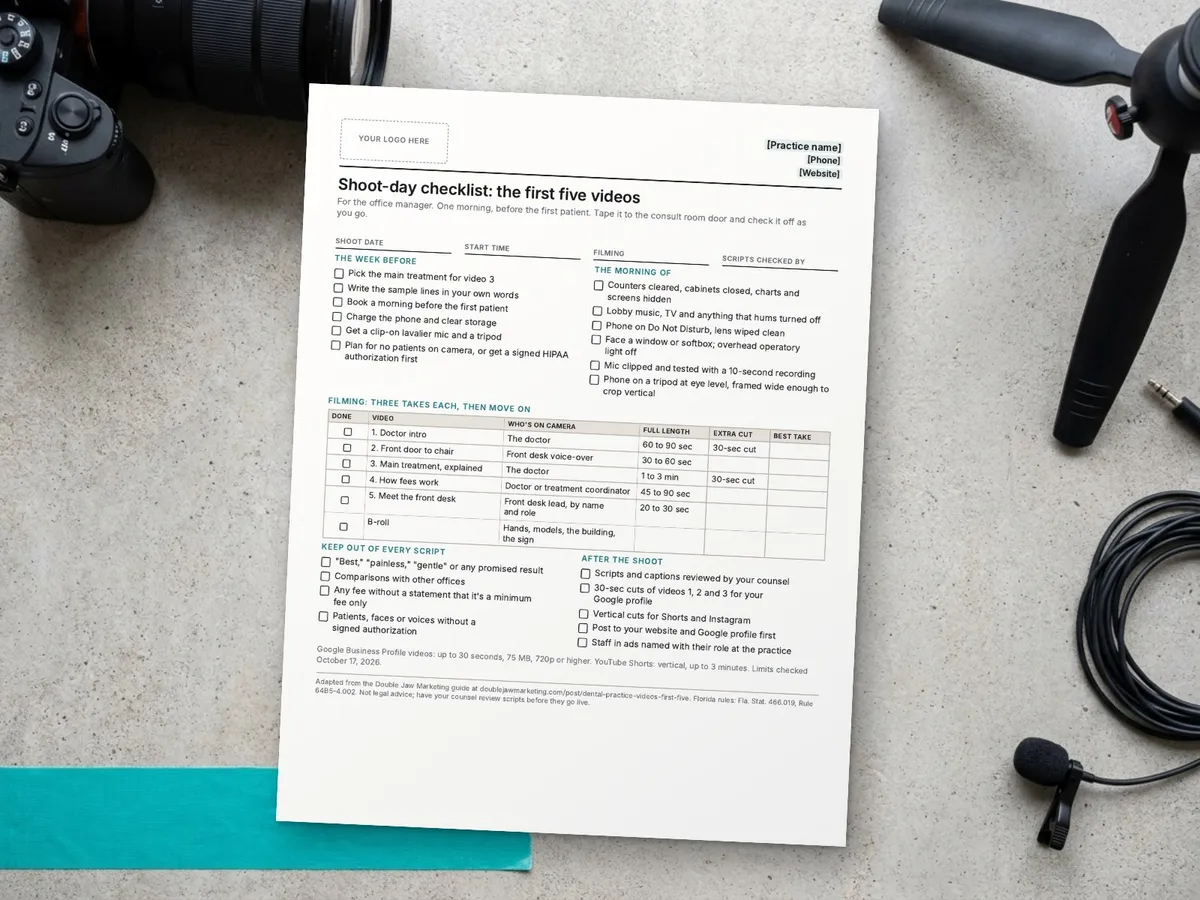
Shoot-day checklist: the first five videos
One page for the office manager: the prep, the five videos with their target lengths, the words to keep out, and the cuts to make after. Put your logo in the box, print it, or copy the text and make it your own.
Print it, or choose Save as PDF in the print window.
Paste the text into Word, Google Docs or your AI tool and make it your own. To print, press Ctrl+P (Cmd+P on a Mac). Only the sheet prints, on US Letter paper.
Email me the full PDF
The polished, multi-page version, ready to brand with your logo. It's free, and we send it by email.
We'll email you the PDF and one follow-up. Unsubscribe anytime. Privacy policy
Shoot-day checklist: the first five videos
For the office manager. One morning, before the first patient. Tape it to the consult room door and check it off as you go.
The week before
- Pick the main treatment for video 3
- Write the sample lines in your own words
- Book a morning before the first patient
- Charge the phone and clear storage
- Get a clip-on lavalier mic and a tripod
- Plan for no patients on camera, or get a signed HIPAA authorization first
The morning of
- Counters cleared, cabinets closed, charts and screens hidden
- Lobby music, TV and anything that hums turned off
- Phone on Do Not Disturb, lens wiped clean
- Face a window or softbox; overhead operatory light off
- Mic clipped and tested with a 10-second recording
- Phone on a tripod at eye level, framed wide enough to crop vertical
Filming: three takes each, then move on
| Done | Video | Who's on camera | Full length | Extra cut | Best take |
|---|---|---|---|---|---|
| 1. Doctor intro | The doctor | 60 to 90 sec | 30-sec cut | ||
| 2. Front door to chair | Front desk voice-over | 30 to 60 sec | |||
| 3. Main treatment, explained | The doctor | 1 to 3 min | 30-sec cut | ||
| 4. How fees work | Doctor or treatment coordinator | 45 to 90 sec | |||
| 5. Meet the front desk | Front desk lead, by name and role | 20 to 30 sec | |||
| B-roll | Hands, models, the building, the sign |
Keep out of every script
- "Best," "painless," "gentle" or any promised result
- Comparisons with other offices
- Any fee without a statement that it's a minimum fee only
- Patients, faces or voices without a signed authorization
After the shoot
- Scripts and captions reviewed by your counsel
- 30-sec cuts of videos 1, 2 and 3 for your Google profile
- Vertical cuts for Shorts and Instagram
- Post to your website and Google profile first
- Staff in ads named with their role at the practice
Google Business Profile videos: up to 30 seconds, 75 MB, 720p or higher. YouTube Shorts: vertical, up to 3 minutes. Limits checked October 17, 2026.
Adapted from the Double Jaw Marketing guide at doublejawmarketing.com/post/dental-practice-videos-first-five. Florida rules: Fla. Stat. 466.019, Rule 64B5-4.002. Not legal advice; have your counsel review scripts before they go live.
See the text version
[Your logo here]
**[Practice name]** | [Phone] | [Website]

# Shoot-day checklist: the first five videos

For the office manager. One morning, before the first patient. Tape it to the consult room door and check it off as you go.

Shoot date: ______________________
Start time: ______________________
Filming: ______________________
Scripts checked by: ______________________

## The week before

- [ ] Pick the main treatment for video 3
- [ ] Write the sample lines in your own words
- [ ] Book a morning before the first patient
- [ ] Charge the phone and clear storage
- [ ] Get a clip-on lavalier mic and a tripod
- [ ] Plan for no patients on camera, or get a signed HIPAA authorization first

## The morning of

- [ ] Counters cleared, cabinets closed, charts and screens hidden
- [ ] Lobby music, TV and anything that hums turned off
- [ ] Phone on Do Not Disturb, lens wiped clean
- [ ] Face a window or softbox; overhead operatory light off
- [ ] Mic clipped and tested with a 10-second recording
- [ ] Phone on a tripod at eye level, framed wide enough to crop vertical

## Filming: three takes each, then move on

| Done | Video | Who's on camera | Full length | Extra cut | Best take |
|---|---|---|---|---|---|
| [ ] | 1. Doctor intro | The doctor | 60 to 90 sec | 30-sec cut |   |
| [ ] | 2. Front door to chair | Front desk voice-over | 30 to 60 sec |   |   |
| [ ] | 3. Main treatment, explained | The doctor | 1 to 3 min | 30-sec cut |   |
| [ ] | 4. How fees work | Doctor or treatment coordinator | 45 to 90 sec |   |   |
| [ ] | 5. Meet the front desk | Front desk lead, by name and role | 20 to 30 sec |   |   |
| [ ] | B-roll | Hands, models, the building, the sign |   |   |   |

## Keep out of every script

- [ ] "Best," "painless," "gentle" or any promised result
- [ ] Comparisons with other offices
- [ ] Any fee without a statement that it's a minimum fee only
- [ ] Patients, faces or voices without a signed authorization

## After the shoot

- [ ] Scripts and captions reviewed by your counsel
- [ ] 30-sec cuts of videos 1, 2 and 3 for your Google profile
- [ ] Vertical cuts for Shorts and Instagram
- [ ] Post to your website and Google profile first
- [ ] Staff in ads named with their role at the practice

Google Business Profile videos: up to 30 seconds, 75 MB, 720p or higher. YouTube Shorts: vertical, up to 3 minutes. Limits checked October 17, 2026.

---
Adapted from the Double Jaw Marketing guide at doublejawmarketing.com/post/dental-practice-videos-first-five. Florida rules: Fla. Stat. 466.019, Rule 64B5-4.002. Not legal advice; have your counsel review scripts before they go live.
Prints on one US Letter page. Not legal advice; have your counsel review scripts before they go live.
I'll plan, film and cut the five videos for you
If you'd rather not do this yourself, this is work I do with my own camera and my own hands:
- Write the five scripts with your doctor and team, in your words
- Film all five at your office on a Sony cinema camera with proper sound and light
- Cut each one for your website, Google Business Profile, YouTube and Instagram
- Check the scripts against Florida's dental ad rules before you post
Start with a Method Review: a free 15-minute call with Blake by phone or Zoom. You get a written Method Plan with the first fixes in order, yours to keep whether we work together or not.
Marketing help only. Not legal or medical advice. No results are guaranteed.
Common questions
Can a dental practice film its videos on a phone?
Yes. A recent phone on a tripod, a clip-on microphone and soft light from a window are enough for all five videos in this guide. Sound matters more than the camera, so use the mic.
How long should a dental practice video be?
As long as it takes to answer one question. Google Business Profile accepts videos up to 30 seconds and YouTube Shorts up to 3 minutes, so cut a 30-second version of each video for your Google profile.
Can patients appear in our practice videos?
Only with a signed HIPAA authorization for marketing use, under 45 CFR 164.508(a)(3), and their written consent to use their likeness. The five videos here are built so you don't need patients on camera.
Where should we post the videos first?
Your website and your Google Business Profile, because that's where a new patient looks right before they call. Then post the vertical cuts to YouTube Shorts and Instagram.
Sources
Checked October 17, 2026. Rules and platform limits change, so check the source before you rely on it.
- Google Business Profile Help: Add or remove photos and videos
- YouTube Help: Upload YouTube Shorts
- HHS: HIPAA Privacy Rule guidance on marketing (authorization, 45 CFR 164.508(a)(3))
- FTC: Endorsement Guides, What People Are Asking (16 CFR Part 255)
- Florida Statutes 466.019, Advertising by dentists
- Florida Administrative Code Rule 64B5-4.002, Prohibited advertising