
Free guides for practice owners and office managers, written by Blake Hickey. Want it done for your practice? Book a Method Review

A written plan for the right cases.

One 15-minute call and a written Method Plan you keep, even if we never work together.

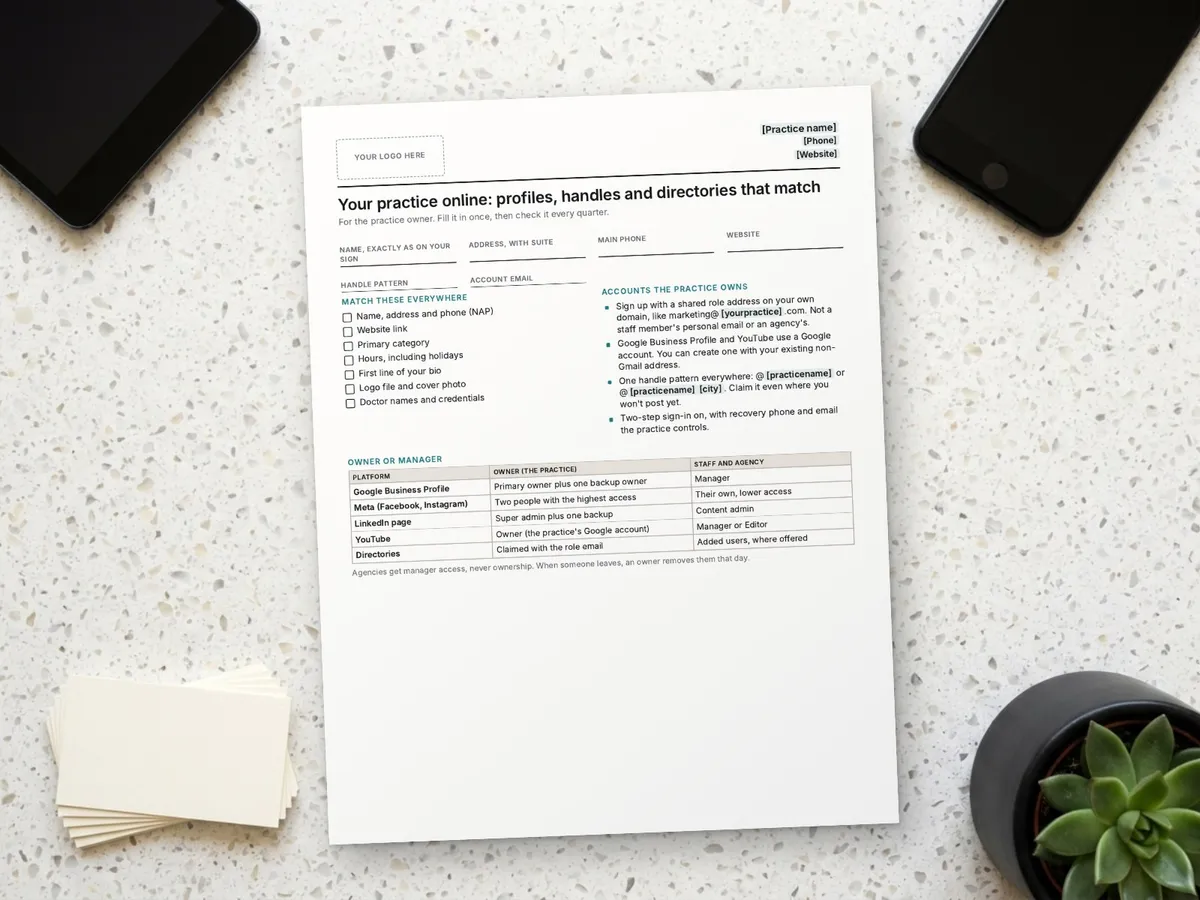
The printed profile and directory checklist on a desk beside a laptop showing a practice's Google Business Profile

Practice Profiles and Directories Checklist: Matching Names, Handles and Logins

October 17, 2026•7 min read

By Blake Hickey, founder of Double Jaw Marketing. For practice owners and office managers. Updated October 17, 2026.

Search for your practice and you may find profiles you forgot about: a Yelp listing someone claimed years ago, an Instagram handle tied to a former employee's email, a Google profile the last agency owns. When the name, phone or hours don't match, people get mixed signals, and when the login sits with someone who left, you can't fix it.

This checklist gets every profile matching and every login back with the practice.

What to match

Start with name, address and phone, often called NAP. Google's guidelines for representing your business say your name should reflect your real-world business name, your phone number should connect to your individual location and be under your direct control, and you should use as few categories as possible to describe your core business. Use that version everywhere else too.

  • Name exactly as it appears on your sign, with the same suite format in the address
  • One main phone number
  • The same website link, going to your home page or the right location
  • The same primary category and hours, including holidays
  • The same first line of your bio, logo file and cover photo
  • Doctor names and credentials written the same way

Pick one handle pattern and claim it everywhere, even on platforms you won't post on yet: @[practicename], or @[practicename][city] if the short one is taken.

Which email to use

Sign up for every account with a shared role address on the practice's own domain, like marketing@[yourpractice].com. The practice owns it, more than one person can get to it, and it doesn't leave when an employee or an agency does. Don't use a staff member's personal email or an address on your agency's domain.

Google Business Profile and YouTube run on a Google account. You don't need a Gmail address for that: Google Account Help says "You don't need to have a Gmail address to create a Google Account" and walks through using your existing email. Use the same role email for every other platform. Turn on two-step sign-in, and set the recovery phone and email to ones the practice controls.

Owner or manager, platform by platform

The rule: the practice owns, everyone else manages. If an owner leaves, another owner from the practice is still there.

PlatformRolesWhat to set
Google Business ProfileOwners and managers. Only one primary owner; managers can't add or remove users.Practice as primary owner plus a backup owner; staff and agency as managers
Meta (Facebook and Instagram)Meta lets you give someone access to your Facebook Page without sharing your login.Two practice people with the highest level of access; staff and agency with less
LinkedIn pagePage admin roles: a super admin has full permissions, including adding or removing other admins; a content admin manages posts.Practice super admin plus a backup; others as content admins
YouTubeChannel permissions: owner, manager, editor and viewer roles. Ownership can't be handed to another person.The practice's Google account as owner; others as manager or editor
DirectoriesEach has its own claim process.Claim with the role email; add users where the directory offers it

Where to be listed

The social profiles: Google Business Profile, Facebook, Instagram, a LinkedIn company page, X, Pinterest and YouTube. The directories: Apple Business Connect, Bing Places, Yelp, Healthgrades, Zocdoc, WebMD and your local chamber, plus the professional ones that apply to you, such as the ADA's Find a Dentist, the AAO's Find an Orthodontist, the AAOMS Find a Surgeon or ASHA ProFind. Each directory sets its own eligibility and membership rules, so check before you list.

Print for your team

The profiles and directories checklist

Page one: what to match, which email to use and who should be owner. Page two: an inventory of 16 platforms with URL, login email, owner, managers and last checked. Put your logo in the box, print it, or copy the text and make it your own.

Print it, or choose Save as PDF in the print window.

Paste the text into Word, Google Docs or your AI tool and make it your own. To print, press Ctrl+P (Cmd+P on a Mac). Only the sheet prints, on US Letter paper.

[Practice name][Phone][Website]

Your practice online: profiles, handles and directories that match

For the practice owner. Fill it in once, then check it every quarter.

Name, exactly as on your signAddress, with suiteMain phoneWebsiteHandle patternAccount email

Match these everywhere

  • Name, address and phone (NAP)
  • Website link
  • Primary category
  • Hours, including holidays
  • First line of your bio
  • Logo file and cover photo
  • Doctor names and credentials

Accounts the practice owns

  • Sign up with a shared role address on your own domain, like marketing@[yourpractice].com. Not a staff member's personal email or an agency's.
  • Google Business Profile and YouTube use a Google account. You can create one with your existing non-Gmail address.
  • One handle pattern everywhere: @[practicename] or @[practicename][city]. Claim it even where you won't post yet.
  • Two-step sign-in on, with recovery phone and email the practice controls.

Owner or manager

PlatformOwner (the practice)Staff and agency
Google Business ProfilePrimary owner plus one backup ownerManager
Meta (Facebook, Instagram)Two people with the highest accessTheir own, lower access
LinkedIn pageSuper admin plus one backupContent admin
YouTubeOwner (the practice's Google account)Manager or Editor
DirectoriesClaimed with the role emailAdded users, where offered

Agencies get manager access, never ownership. When someone leaves, an owner removes them that day.

Profile inventory

PlatformURL or handleLogin emailOwnerManagersLast checked
Google Business Profile
Facebook
Instagram
LinkedIn page
X
Pinterest
YouTube
Apple Business Connect
Bing Places
Yelp
Healthgrades
Zocdoc
WebMD
ADA Find-a-Dentist
AAO / AAOMS / ASHA ProFind
Local chamber

Sources: Google Business Profile, Google Account and YouTube Help; Meta and LinkedIn. I'm not a lawyer or a doctor. This is what I've learned helping practices, shared to help you. It's general information for Florida practices as of October 2026, not legal or medical advice. Rules differ by state and change, so have your attorney review it before you use it. Template from Double Jaw Marketing, doublejawmarketing.com/resources.

See the text version
[Your logo here]
**[Practice name]** | [Phone] | [Website]

# Your practice online: profiles, handles and directories that match

For the practice owner. Fill it in once, then check it every quarter.

Name, exactly as on your sign: ______________________
Address, with suite: ______________________
Main phone: ______________________
Website: ______________________
Handle pattern: ______________________
Account email: ______________________

## Match these everywhere

- [ ] Name, address and phone (NAP)
- [ ] Website link
- [ ] Primary category
- [ ] Hours, including holidays
- [ ] First line of your bio
- [ ] Logo file and cover photo
- [ ] Doctor names and credentials

## Accounts the practice owns

- Sign up with a shared role address on your own domain, like marketing@[yourpractice].com. Not a staff member's personal email or an agency's.
- Google Business Profile and YouTube use a Google account. You can create one with your existing non-Gmail address.
- One handle pattern everywhere: @[practicename] or @[practicename][city]. Claim it even where you won't post yet.
- Two-step sign-in on, with recovery phone and email the practice controls.

## Owner or manager

| Platform | Owner (the practice) | Staff and agency |
|---|---|---|
| Google Business Profile | Primary owner plus one backup owner | Manager |
| Meta (Facebook, Instagram) | Two people with the highest access | Their own, lower access |
| LinkedIn page | Super admin plus one backup | Content admin |
| YouTube | Owner (the practice's Google account) | Manager or Editor |
| Directories | Claimed with the role email | Added users, where offered |

Agencies get manager access, never ownership. When someone leaves, an owner removes them that day.

---

## Profile inventory

| Platform | URL or handle | Login email | Owner | Managers | Last checked |
|---|---|---|---|---|---|
| Google Business Profile |   |   |   |   |   |
| Facebook |   |   |   |   |   |
| Instagram |   |   |   |   |   |
| LinkedIn page |   |   |   |   |   |
| X |   |   |   |   |   |
| Pinterest |   |   |   |   |   |
| YouTube |   |   |   |   |   |
| Apple Business Connect |   |   |   |   |   |
| Bing Places |   |   |   |   |   |
| Yelp |   |   |   |   |   |
| Healthgrades |   |   |   |   |   |
| Zocdoc |   |   |   |   |   |
| WebMD |   |   |   |   |   |
| ADA Find-a-Dentist |   |   |   |   |   |
| AAO / AAOMS / ASHA ProFind |   |   |   |   |   |
| Local chamber |   |   |   |   |   |

---
Sources: Google Business Profile, Google Account and YouTube Help; Meta and LinkedIn. I'm not a lawyer or a doctor. This is what I've learned helping practices, shared to help you. It's general information for Florida practices as of October 2026, not legal or medical advice. Rules differ by state and change, so have your attorney review it before you use it. Template from Double Jaw Marketing, doublejawmarketing.com/resources.

Prints on two US Letter pages. Platform roles and settings change; check each help center before you change ownership.

Want this done for your practice?

I'll match your profiles and get your logins back

If you want this finished without pulling your team off the phones, this is work I do:

  • Find every profile and directory listing for your practice
  • Match the name, address, phone, bio, photos and hours
  • Move ownership to a role email the practice owns
  • Hand you a finished inventory with owners and managers

Start with a Method Review: a free 15-minute call with Blake by phone or Zoom. You get a written Method Plan with the first fixes in order, yours to keep whether we work together or not.

Marketing help only. Not legal or medical advice. No results are guaranteed.

Common questions

Do we need a Gmail address for our Google Business Profile?

No. Google Account Help says you don't need a Gmail address to create a Google account, and you can use your existing email instead.

Should our marketing agency own our Google Business Profile?

The practice should be the primary owner, with a backup owner. Give the agency manager access. Managers can't add or remove users.

What does NAP consistency mean?

Your practice name, address and phone number written the same way on every profile and directory, matching your sign and website.

Which email should we use for social media accounts?

A shared role address on your own domain, like marketing@[yourpractice].com, that the practice owns and more than one person can get to.

Claims and sources

Checked October 17, 2026. Rules and platform settings change, so check the source before you rely on it.

  1. Business name, phone, website and category guidelines: Google Business Profile Help: Guidelines for representing your business on Google
  2. Owners and managers; one primary owner; managers can't add or remove users: Google Business Profile Help: Manage owners and managers
  3. Google account with a non-Gmail address: Google Account Help: Create a Google Account
  4. Giving someone access to a Facebook Page: Meta Business Help Center: How do I give someone access to my Facebook Page?
  5. LinkedIn super admin and content admin roles: LinkedIn for Nonprofits: How to grant admin access to your LinkedIn Page
  6. Professional directories: ADA News: Find a Dentist tool
  7. AAO Find an Orthodontist: AAO
  8. AAOMS Find a Surgeon: AAOMS
  9. ASHA ProFind: ASHA
  10. YouTube channel permission roles; ownership can't be transferred: YouTube Help: channel permissions
Blake Hickey

Blake Hickey

Blake Hickey has worked in marketing since 2006 and runs Hickey Media LLC in Jupiter, Florida. He is the marketing director at an IT and cybersecurity company, hosts and produces The Florida Bar Business Law Section's continuing legal education series on lawyer advertising compliance, and plans the campaigns, shoots the video and designs the ads himself. He writes from accounts he has run, not from theory. Nothing here is legal advice, and no result is promised.

LinkedIn logo icon
Instagram logo icon
Youtube logo icon
Back to Blog