
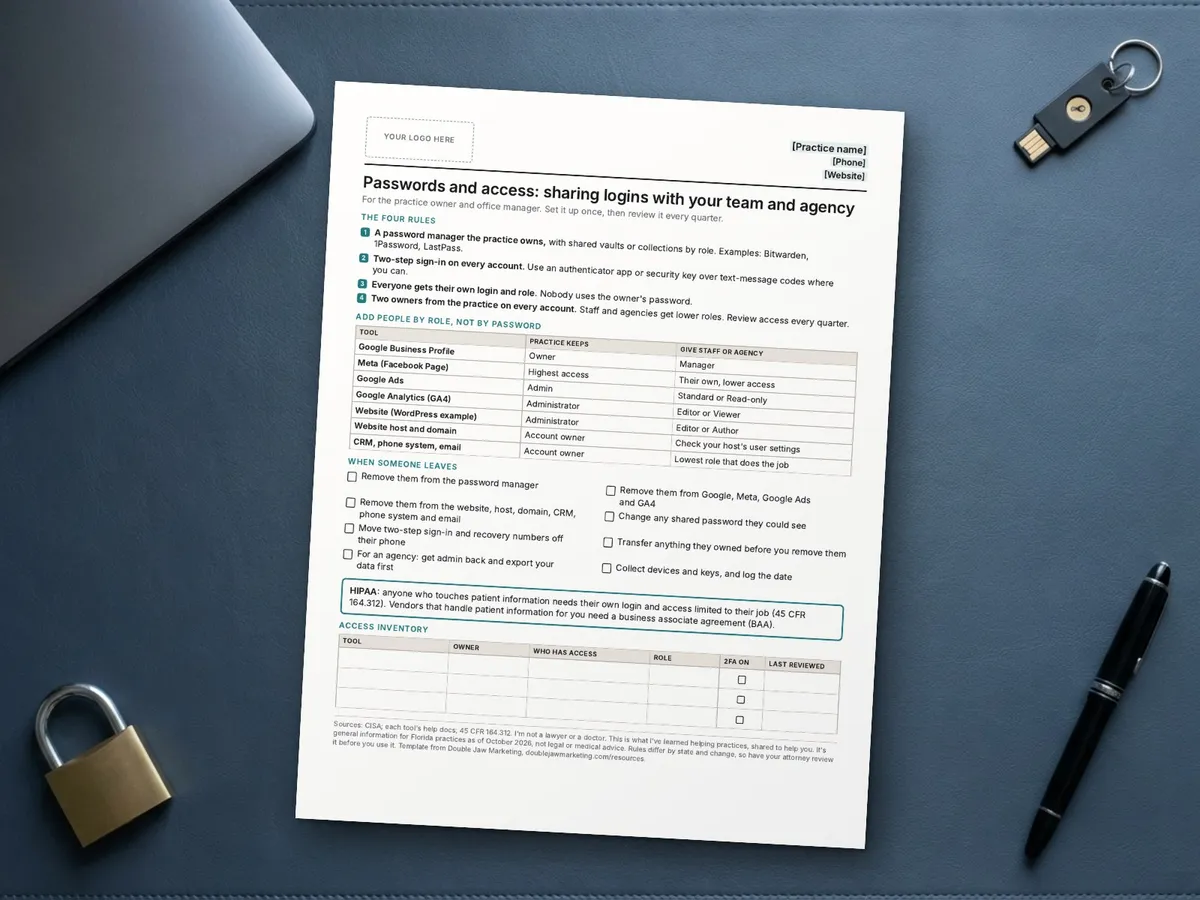
Passwords and Team Access: Sharing Logins With Staff and Agencies Safely
By Blake Hickey, founder of Double Jaw Marketing. For practice owners and office managers. Updated October 17, 2026.
If your Google login lives on a sticky note, your Facebook password is one the last office manager used everywhere, or your agency has the owner's password, it works until someone leaves, a phone gets lost or an account gets taken over.
The fix isn't complicated: a password manager the practice owns, two-step sign-in everywhere, and everyone getting their own login with the role they need.
Use a password manager the practice owns
A business password manager lets you share logins with the people who need them, by role, without passing passwords around. Bitwarden groups shared logins into collections that belong to the organization, not to one person. 1Password lets you share vaults with team members or groups and set what each can do. LastPass is another option some practices use; in December 2022 the company reported a security incident in which an unauthorized party accessed a backup of customer vault data, with passwords and other sensitive fields encrypted. Compare the current features and security documentation of any tool before you choose.
Whatever you pick, the practice owns the account, at least two people at the practice can administer it, and you set up shared folders by role: front desk, clinical, marketing, agency.
Turn on two-step sign-in
CISA says multifactor authentication makes accounts much more secure, and that any MFA is better than none. Its fact sheet on phishing-resistant MFA ranks methods from strongest to weakest: FIDO security keys and passkeys first, then authenticator apps, with text-message and voice codes last. CISA says SMS and voice should be used only as a last resort. Use an authenticator app or a security key where the account supports it.
Give access by role, not by password
The main tools your marketing runs on let you add people with their own login and a limited role. Keep the top role with the practice.
| Tool | Top role (practice keeps) | Role for staff or agency |
|---|---|---|
| Google Business Profile | Owner | Manager: can't add or remove users |
| Meta (Facebook Page) | The highest level of access | Their own access, not your login |
| Google Ads | Admin: manages users and payments | Standard (edits campaigns) or Read-only |
| Google Analytics 4 | Administrator: adds and removes users | Editor or Viewer |
| WordPress website | Administrator | Editor or Author |
| Website host and domain | Account owner | Check your host's user or team settings |
When someone leaves
Do it the same day, in this order: transfer anything they own, remove them from every tool, change any shared password they could see, and move two-step sign-in and recovery numbers off their phone. When an agency leaves, get your admin access back and export your data before you remove them. GA4 won't let the last Administrator delete themselves, and Google Business Profile won't let a primary owner leave until they transfer that role, so check who holds those before anyone goes.
A HIPAA note
If a login can reach patient information, HIPAA's Security Rule applies. 45 CFR 164.312 requires access controls that allow access only to people who've been granted it, and a unique name or number for each user. Shared logins work against both. A vendor that performs functions for you involving patient information is generally a business associate, and HHS says you need a business associate agreement before you share that information with it. Your marketing tools usually shouldn't hold patient information at all; if one does, talk to your attorney.
I'll audit who has access to your marketing
If you want this finished without pulling your team off the phones, this is work I do:
- List every marketing account and who can get in
- Move ownership back to the practice
- Set roles for staff and any agency
- Hand you a finished access inventory and offboarding list
Start with a Method Review: a free 15-minute call with Blake by phone or Zoom. You get a written Method Plan with the first fixes in order, yours to keep whether we work together or not.
Marketing help only. Not legal or medical advice. No results are guaranteed.
Common questions
Should we give our marketing agency our Google password?
No. Add the agency as a user with its own login and a lower role, such as manager on Google Business Profile or Standard in Google Ads, and keep ownership with the practice.
Is a text-message code good enough for two-step sign-in?
It's better than nothing, but CISA ranks SMS and voice codes as the weakest form and says to use them only as a last resort. Use an authenticator app or security key where you can.
What should we do when an employee leaves?
Transfer anything they own, remove them from every tool, change shared passwords they could see and move recovery numbers off their phone, the same day.
Does HIPAA apply to our marketing logins?
It applies to any system with patient information. HIPAA requires unique user logins and access controls, and vendors handling patient information need a business associate agreement.
Claims and sources
Checked October 17, 2026. Rules and platform settings change, so check the source before you rely on it.
- Bitwarden collections: Bitwarden Help: About collections
- 1Password shared vaults: 1Password Support: Create, share and manage vaults in your organization
- LastPass December 2022 incident: LastPass: Notice of security incident, December 22, 2022
- MFA makes accounts more secure; any MFA is better than none: CISA: More than a password
- SMS and voice MFA last resort; strength order: CISA fact sheet: Implementing phishing-resistant MFA (PDF)
- Google Business Profile owners and managers: Google Business Profile Help
- Giving someone access to a Facebook Page: Meta Business Help Center: How do I give someone access to my Facebook Page?
- Google Ads access levels: Google Ads Help: About access levels
- GA4 users and the last Administrator: Analytics Help: Add, edit and delete users
- WordPress roles: WordPress.org: Roles and capabilities
- HIPAA access control and unique user identification: eCFR 45 CFR 164.312
- Business associates and BAAs: HHS: Business associates